
Your community runs on Circle and now you want to sell access to it. The built-in paywall looks like the shortest path. Here is an honest read on what the Circle paywall is good for. Plus the ticket size where you outsource the checkout instead.
With real numbers from the Circle docs, as of 2026.
Use the Circle paywall for memberships and skip it on high-ticket. For subscriptions up to a few hundred dollars it is convenient and fast to switch on. Above $5,000 the contract, the signature and the dunning are missing.
- Circle paywalls start on the Professional plan at $89 a month.
- Circle keeps an extra 2 percent per payment, on top of Stripe's fees.
- No contract, no signature, no dunning of your own, no ACH debit.
- For high-ticket: outsource the checkout, let Circle grant access automatically.
If all you sell is a $29 membership for a hobby community, you can stop reading here.
What the Circle paywall actually is
Circle is a community platform. The paywall is its built-in payment layer. You mark which spaces are paid and Circle collects at the door.
Circle paywall: The built-in payment feature of the community platform Circle, available from the Professional plan. It attaches a price to access for spaces or courses and processes the payment through Stripe. Circle grants and revokes access automatically, and every payment carries its own Circle transaction fee.
Sounds good so far, right? For a classic membership it genuinely is. One click, card in, member inside.
Switching it on is faster than most people expect. You need the Professional plan, a connected Stripe account and a space to lock.
Then you attach a price and pick the removal policy. Mine was done in an afternoon.
The catch shows up on a closer look. The paywall is an access switch with a payment feature, not a sales tool.
That bites the first time a third installment on an $18,000 contract bounces. All you hold is a standard Stripe email.
What the Circle paywall gets right
- Access and payment are coupled, so nobody sits in the community for free.
- Up to 6 pricing options per paywall, including subscriptions and one-time payments.
- Pulling access after a cancellation runs automatically through the removal policy.
Where it hits its limits
- A Circle fee of 2 percent per payment, on top of Stripe.
- No contract, no e-signature, no personalized checkout.
- No dunning of its own, everything hangs on Stripe retries.
What Circle with a paywall really costs
The monthly fee first. Professional runs $89 a month and Business sits at $199. Circle Plus and Enterprise are custom pricing.
Paywalls only start on Professional. Professional gives you 3 admins and 200 GB of storage, Business 5 admins and 500 GB.
You can test it 14 days free without a credit card. A 30 day money back guarantee sits behind that.
Now the annoying part. Circle charges its own transaction fee on every paywall payment. On Professional that is 2 percent, on Business 1 percent, on Circle Plus 0.5 percent.
Stripe processing lands on top. On cards that typically starts at 2.9 percent plus $0.30. International payments and currency conversion push it higher.
Run that against a real ticket. On a $15,000 program, 2 percent for Circle is $300. Per deal, on top of Stripe, purely because the money moved through the paywall.
Ten deals like that a month is $36,000 a year. Not fun. Push a lot of big tickets through the paywall and the convenience gets expensive.
Which payment methods your buyers actually get
Everything settles through one connected Stripe account. Supported are cards, Link, Google Pay and Apple Pay. PIX is limited to Brazilian Stripe accounts.
What the docs leave out weighs more at five figures. No ACH debit, no PayPal, no pay by invoice. Those are the first three things a business buyer asks about on a large amount.
The currency side is broad, at least. Circle supports member payments in USD, EUR, GBP, CAD, AUD and BRL. An international member can pay in their own currency.
The method is where it blows up. Card limits are the classic case, since a $20,000 close rarely clears on a personal card.
Your buyer asks to wire the money instead and the paywall has no answer. It knows the card form and nothing else.
Which providers you connect directly instead sits in the rundown of the best payment providers for coaches.
Selling to members abroad: the interface translates, the edges do not
One point almost everyone misses. Circle ships English, Spanish, French and German as interface languages. You can even set a default language for new members.
That covers the surface. Menus, buttons and standard messages arrive in your member's language.
The gaps sit in the edges. In the Circle forum the recurring complaint is that the localization stays incomplete. Parts of your own copy can only be maintained in English.
On a normal membership that is a cosmetic flaw. On a five figure close it flips. A half translated payment path costs trust at the exact moment your buyer is most unsure.
Pricing options: what you can set per paywall
Circle is more flexible here than people assume. Each paywall carries up to 6 pricing options. That covers monthly and yearly subscriptions, one-time payments and installments.
Installments are a one-time fee split into parts. Subscription and installment prices also allow trials and upfront payments. For a standard membership that covers the usual cases.
What is missing is the sales layer. A closer cannot build an individual payment plan for one specific buyer. There are 6 options for everybody, not the one deal for this one person.
How individual installments work instead is broken down for payment plans through your own Stripe account.
Tax: Circle does not file, Stripe Tax does the math
Short and important. Circle does not handle tax itself. Instead it integrates Stripe Tax for sales tax and VAT.
Setting that up is on you as the community owner. So is compliance. Invoicing runs through Stripe, not through Circle.
This is where most people trip. They assume the platform takes care of tax, because other providers work that way. Circle is not a reseller, so you are the seller on record and you carry the filing.
The expensive mistake
Going live with the paywall before Stripe Tax is set up properly. Without that setup Circle collects no tax for you. Let it run unnoticed for months and you pay the tax out of your own margin, five figures on big tickets.
Failed payments: what Circle does and what it does not
Now the core for anyone selling installments. Circle has no dunning of its own. When a payment fails the subscription goes past due and Stripe takes over.
Stripe retries on the schedule you configured in your own account. If every attempt fails, the subscription cancels. The member loses paywall access automatically.
The communication is outsourced too. Reminders like card expiring or payment failed are standard Stripe emails you set up in Stripe. There is no Circle grace period and no escalation logic.
Let's be honest. On a $29 subscription none of that matters, cancellation by non-payment is almost a feature. On a $2,500 monthly installment from a $30,000 deal it is a hole in the boat.
What a proper sequence with dunning stages looks like is in the piece on automating your dunning.
Myth
The paywall handles missed payments by itself, access gets pulled automatically anyway.
Reality
The automatic removal protects your community, not your revenue. Circle pulls access but never chases the open amount, because the retry and email logic live in Stripe. On high-ticket installments you need a system that follows the money, not just one that closes the door.
High-ticket through the paywall: the hard limit
Here it gets fundamental. The Circle paywall checkout knows nothing about contracts. No e-signature, no individual payment plan per buyer, no checkout a rep can personalize.
For a subscription that is fine. For a $25,000 mentoring it is a dealbreaker. You want a signature, a documented waiver and a record that holds up in a dispute.
Then there is sales. Your closers negotiate on the call and adjust price and installments live. The paywall knows only its fixed options, so your closer cannot steer anything behind it.
That ends in link chaos. The closer messages you mid-call and you build a new pricing option in a hurry.
Your buyer waits on the phone. Deals tip over right there.
The trap I treated access management as selling for far too long. A $15,000 program ran entirely on the community paywall, a good thirty closes with no contract and no signature. When one client disputed the scope after four months, all I had was a line in Stripe.
The fix Every close now runs through my own checkout with an e-signature. My own Stripe account watches the installments and dunning goes out automatically. Circle only grants access afterwards, triggered by the incoming payment.
The better split: Circle does access, your checkout does selling
Okay. Enough problem, here is the model that works at high-ticket. You separate the jobs cleanly.
Circle stays what it is best at, the home of your community. Selling happens in front of it, through your own checkout with a contract and your own payment accounts. Which models exist for that is sorted in the big checkout platform comparison.
There are roughly two roads. Reseller platforms sell in your name and take a cut of revenue. The tax then runs through their books instead of yours.
The other road lets your own Stripe or PayPal account collect, for a flat monthly fee. With revenue shares in the typical range of 5 to 7 percent the two separate fast.
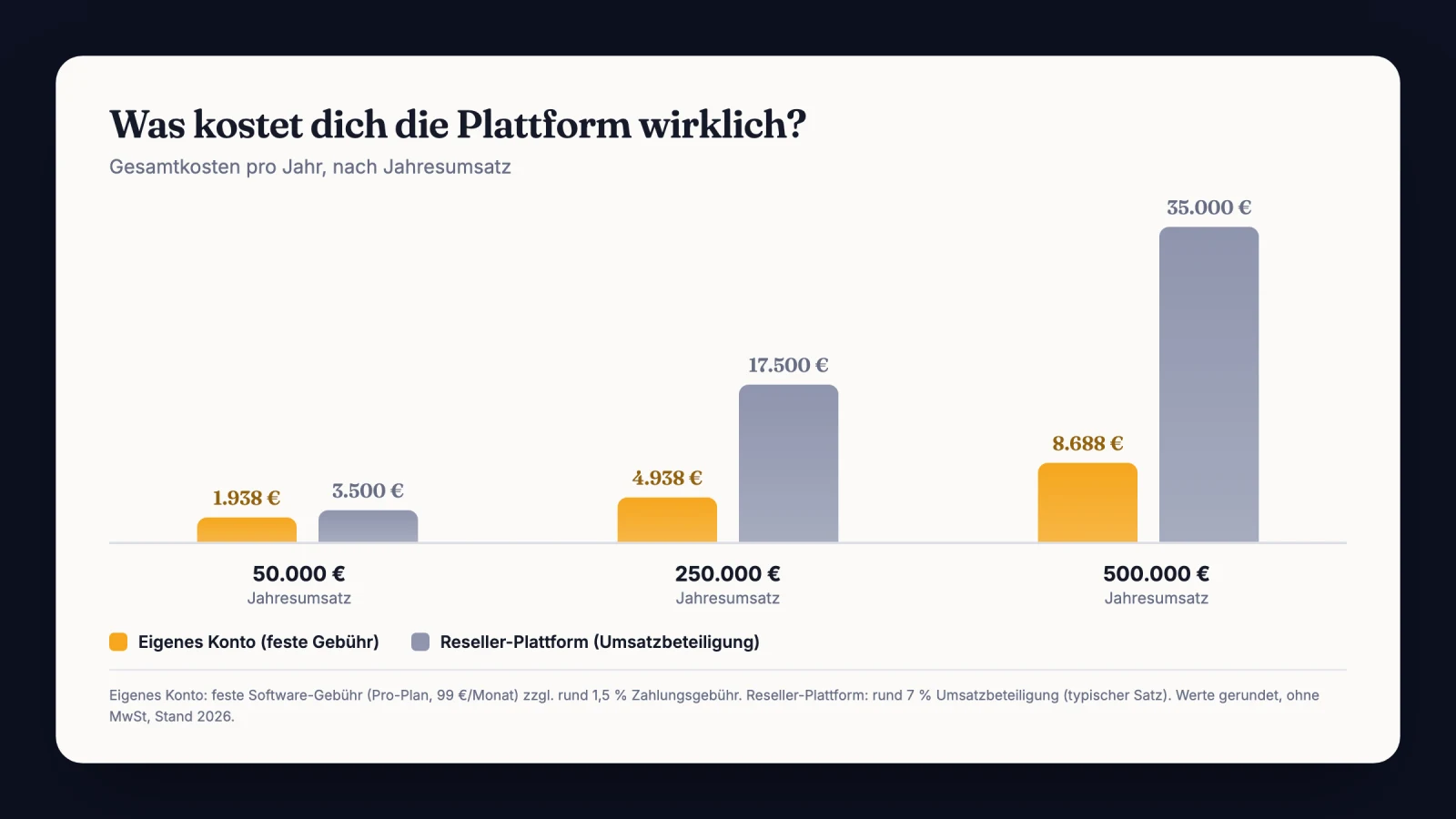
Access still runs automatically. CloserCart has a native Circle integration. On the first incoming payment your client gets invited and receives the mapped spaces and access groups.
Your closer builds the installments per client, which is called Split at CloserCart. No new link, no callback to the owner.
When an installment bounces, a grace period of 7 days kicks in. Only after that is access revoked. Every new incoming payment restores it automatically.
That buffer is the whole difference to a bare paywall. A good client with an expired card does not get kicked out on the spot. The mapping itself is walked through step by step under automating Circle access.
Circle paywall and an outsourced checkout side by side
| Criterion | Circle paywall | Own checkout + Circle |
|---|---|---|
| Best fit | Memberships and subscriptions | Offers from $5,000 up |
| Strengths | Setup in minutes, one tool | Contract, signature, own dunning |
| Limits | No contract, no ACH debit | Two tools, one account setup |
| Cost model | 2% Circle fee plus Stripe | Flat monthly fee plus Stripe |
Insider tip
I do not map Circle access per product, I map it per price point. The intro package gets the main space only, the full mentoring adds the mastermind group. The upsell then sells itself, because the client sees the locked spaces sitting in the sidebar.
The cost question, done soberly
Quick stop before we move on. The models differ less per line item than they do at scale. Percentage fees grow with revenue, flat fees do not.
On a $49 membership you never feel 2 percent. On deals between $15,000 and $30,000 it is a three figure amount per close. Normal Stripe fees apply either way in both cases.
Here is the structure side by side, as of 2026:
Circle plans and paywall costs at a glance
| Plan | Price per month | Circle fee | Limits |
|---|---|---|---|
| Professional | $89 | 2 percent | 3 admins, 200 GB |
| Business | $199 | 1 percent | 5 admins, 500 GB |
| Circle Plus | Custom pricing | 0.5 percent | Unlimited admins, 1 TB |
Fair point: anyone who wants to cut the fee can move up to the Business plan. At very high paywall volume that can pay off. The structural gaps around contracts and dunning do not close with a plan change.
How an automatic cancellation nearly cost me a client
Quick detour into practice. A few years back I ran a program with community access and payment plans. Around forty contracts ran in parallel and the open installment volume was six figures.
One client, a clean $24,000 deal, paid monthly.
His corporate card expired in the summer. The installment bounced and the retries ran into nothing, because the new card never got added. He was abroad for three weeks and simply never read the standard emails.
The system did exactly what it was built to do. It cancelled and threw him out of the community. Mid program he stood in front of a locked door.
He called me and he was furious. Not about the installment, he would have paid that on the spot. It was being treated like a delinquent debtor after five payments on time.
I restored his access by hand and apologized. The deal survived, the trust took a hit.
I have had a fixed rule since then. Between a bounced installment and removal there is always a grace period. The first message comes from me, not from the payment system.
Forget the all-in-one reflex
The usual advice is to keep everything in one tool, because it is simpler. Sounds reasonable and points the wrong way at high-ticket. Simple to set up is not the same as stable in business.
The better question is not how many tools you run. It is where your money and your evidence sit when something goes wrong.
A tool that collects but knows neither contracts nor dunning saves you one integration. In the bad case it costs you a deal.
My metric for this is simple: fully collected deals. Not tool count, not fee percentages.
This is where a lot of people get it wrong. They optimize the setup instead of the money landing.
Two specialized tools with clean automation beat one generalist. Circle for the community, a real checkout for the selling. The connection between them is a mapping today, not a project.
What I would do in the first 7 days
Selling high-ticket with a Circle community and want to draw the line cleanly? Here is the plan for one week. No magic, just order.
- Document every current paywall price and open installment in Circle.
- Set up your own checkout and connect your Stripe account.
- Load your contract with an e-signature and a documented waiver.
- Connect the Circle integration and map spaces per price point.
- Run a test purchase and check that the Circle invite arrives on its own.
- Test the grace period: let an installment fail, access should hold for 7 days.
- Close new deals through your own checkout only, let old paywall subscriptions run out.
The last point matters. You do not have to migrate existing paywall subscriptions in a panic. New deals run the new way and the rest expires on its own.
Before your first deal runs the new way
- Stripe Tax or your own tax setting checked.
- Circle mapping set per product and per price point.
- Test payment ran through and access granted automatically.
- Dunning stages and grace period played through once.
- Contract and signature checked on a test buyer.
Frequently asked questions about the Circle paywall
What does the Circle paywall cost?
Paywalls only start on the Professional plan, which runs $89 a month. On top of that Circle keeps 2, 1 or 0.5 percent of every payment. Which rate applies depends on your plan. Stripe fees are separate, typically from 2.9 percent plus $0.30 on cards.
Does the Circle paywall support PayPal or ACH debit?
No, neither one shows up in the docs, and pay by invoice is missing too. Billing runs through the connected Stripe account only, so cards, Link, Google Pay and Apple Pay. PIX stays reserved for Brazilian Stripe accounts. On currency you are free: USD, EUR, GBP, CAD, AUD or BRL.
Can I offer payment plans through the Circle paywall?
Yes, installments exist as a one-time fee split into parts, plus trials and upfront payments. You set a maximum of six pricing options, and those apply to every buyer the same way. An individual plan per client is not possible, and neither is dunning for a bounced installment.
What happens on a failed payment in Circle?
The subscription slips to past due and your Stripe account takes over completely. It retries on the schedule stored there, and if that fails too, the cancellation follows. Access falls away after that, and Circle has no grace period or dunning stage of its own.
Can Circle grant access automatically if I sell elsewhere?
Yes, that is what integrations are for. CloserCart invites your client as soon as the first payment lands, including the mapped spaces and access groups. After a bounced installment the access holds for 7 days. A fresh incoming payment unlocks it again immediately.
Sources
- Circle Pricing (official)
- Paywall transaction fees | Circle Knowledge Base
- Manage payment method availability for paywalls | Circle Knowledge Base
- Explore pricing options for paywalls | Circle Knowledge Base
- Understanding the cancelation process for failed payments | Circle Knowledge Base
- Understanding Stripe Tax integration with Circle paywalls | Circle Knowledge Base
- Circle now supports member payments in EUR, GBP, CAD, AUD & BRL | Circle Community
- Set a default language for new members | Circle Knowledge Base
Sell with a contract and let Circle handle access
With CloserCart you connect your own payment providers and close with an e-signature. Circle access lands automatically on payment, with 7 days of grace when an installment bounces.
Start now for €1 14 days for €1. Cancel monthly. 0% revenue share.